


Pregnancy Tracker: Baby Growth
0.00.00 Reviews
App Specs
- Version
- 1.0.1
- Updated On
- License
- Free
- Downloads
- 500,000+
- Developer
- Tools for Everyday - AI Tasks
- Categories
- Parenting
- Platform
- Android
Screenshots

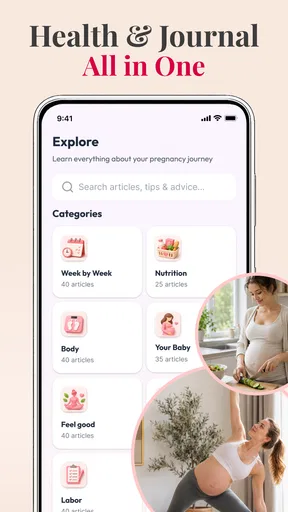
 Analysis by AppCompare
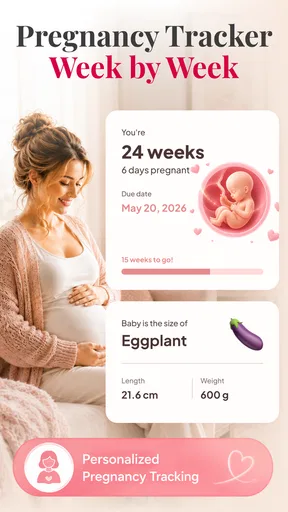
I’d use a pregnancy tracker for orientation, not as another health dashboard to monitor all day. Pregnancy Tracker: Baby Growth is built around checking how pregnancy changes from week to week, with 3D visuals that give each stage a more tangible feel. That focus makes it easiest to judge by a simple question: does a brief look help you picture the current stage, without making you feel you need to keep checking?
Who is likely to get the most from it
I can see it suiting someone who is curious about the broad progression of pregnancy and prefers looking at an image to reading a dense block of text. It may also help a partner or relative follow along: a shared visual can give you something concrete to talk about, even if the other person is not looking for detailed health information.
The best way to try it is to give each visit a small purpose. You might check the current week, look at the visual together, and then close the app. If you want to keep an appointment question, write it in the place you already use for health notes rather than assuming a general tracker is an appropriate clinical record.
Putting a check-in into an ordinary day
Imagine you have just got home from an appointment and want to explain the current stage to your partner over dinner. A brief look at the weekly view could make that conversation easier than trying to recall a week number or describe development from memory. It can serve as a shared point of reference, while the clinician’s advice remains the source for decisions about your own pregnancy.
That division of jobs is useful when several people are involved. The tracker can support general curiosity; a calendar can hold appointment dates; and a personal health record or notes app can keep the details you need to discuss with your care team. Keeping those roles separate is less convenient than expecting one app to do everything, but it also reduces the chance of mistaking a broad overview for a personalized record.
Quick check-ins, not a medical dashboard
In normal use, a pregnancy tracker is most helpful when it answers one small question promptly: what stage am I at, and what might be changing now? The weekly structure here gives that question a clear place to start. The 3D presentation can make growth easier to picture than a short paragraph alone, particularly for someone who finds abstract comparisons hard to imagine.
I would treat the visuals as an aid to understanding, not as a precise depiction of an individual baby. Pregnancy develops differently from person to person, and an illustration cannot tell you whether your own pregnancy is progressing normally. That distinction matters: the app can make a weekly check-in engaging, but symptoms, test results, and personal concerns belong in a conversation with a qualified clinician.
Worth Reading Before You Choose

Switching to Android Auto Means Rethinking Your Driving Routine

Google Calendar Makes a Crowded Week Easier to Manage

Baby Panda World Brings Quick Play to Modern Phones, but Its Game Library Feels Busy

ESPN’s Live Game View Makes Following Close Games Easier

QuizzLand Review: A Good Fit for Short Trivia Breaks, Not Every Player

Basketball Stars: Multiplayer Is Fast, but Can It Recover When Matches Go Wrong?
The developer is Tools for Everyday - AI Tasks, and the app sits in the parenting category. That makes sense for its everyday role: it is something an expectant parent might consult alongside practical family planning, rather than a specialist health record. The app is free to start, with in-app purchases listed from $2.99 to $11.99 per item, so I would check what is available before relying on any paid material as part of a routine.
A useful rhythm for busy days
The week-by-week format suits brief visits better than long sessions. For example, if I had a few minutes during a lunch break, I could open the current stage, look at the 3D visual, and come away with a simple sense of where things stand. That is a more realistic use than expecting to spend time in the app every day. Pregnancy changes gradually, so a weekly habit is often more meaningful than repeatedly checking the same information.
One practical approach is to pair a visit with an existing routine, such as a weekly planning moment or a conversation with a partner. That helps keep the app useful without turning it into another daily obligation. If something raises a question, I would note it for the next appointment rather than treating a general tracker explanation as a diagnosis.
It can also be a low-pressure way to involve someone who is not carrying the pregnancy. A partner or family member may find a visual overview easier to follow than a string of week numbers. The trade-off is that shared interest should not be confused with shared medical access: this is best used as an explanatory companion, not as a substitute for a clinician’s guidance or an individual care plan.
When the visuals help—and when they may not
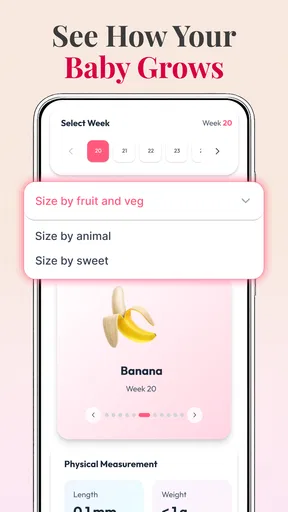
The 3D element is the app’s clearest point of distinction. Compared with a plain calendar or a tracker that presents information mainly as text, a visual can make a stage feel more concrete and memorable. I can see it being especially useful for first-time parents who want a simple mental picture, or for someone who prefers to learn by looking rather than reading a dense explanation.
There is a trade-off, though. A polished image can feel more exact than it really is, so I would avoid reading it as a personalized measurement. If your main goal is tracking appointments, symptoms, medication, or clinician instructions, a dedicated health record or a note-taking method may be a better fit. A visual weekly guide is pleasant, but it is not the same thing as a record tailored to your care.
Another useful habit is to decide what you want from each visit before opening the app. If the goal is to understand the current week, the visual is likely enough. If the goal is to settle a worry about pain, movement, or a test result, the app is the wrong place to seek reassurance. Making that distinction in advance can prevent a general-purpose pregnancy resource from being asked to do a job it cannot safely do.
What heavier use is likely to feel like
The basic concept does not call for demanding, continuous interaction: a weekly tracker is naturally suited to short sessions. I would expect the most involved moments to come when someone browses several stages at once, revisits the app with a partner, or spends time exploring whatever paid content they choose. Those are different from a quick check-in, and they can make the experience feel more substantial without making it a daily necessity.
I would not judge this app by how many minutes it can hold attention. For this kind of tool, a fast path back to the current week is more valuable than a long session. If I were evaluating it on my own phone, I would pay attention to whether it opens smoothly, whether the current stage is easy to find, and whether the 3D view remains comfortable to use on my screen. Those are sensible checks for any visual app, not claims about measured performance.
For a realistic routine, imagine someone checking the app on the way home after an appointment. They want to revisit the current week’s illustration, then mention it to their partner over dinner. That is a good fit for a lightweight tracker. If the same person starts comparing several weeks, looking for answers to a new symptom, and trying to record detailed clinical information, the app may no longer be the right single tool; a care provider and a more structured record become more useful.
Reliability and the limits of a weekly guide
Reliability here is partly about consistency of purpose. A week-by-week tracker should help a user orient themselves without encouraging them to treat general information as a personal assessment. I would use it as a reference for broad context, then keep health decisions grounded in professional advice. That is not a weakness unique to this app; it is an important boundary for pregnancy content in general.
For someone returning after a few days or weeks away, the weekly format offers an obvious point of re-entry: check the current stage rather than feeling obliged to catch up on every missed visit. That can make the app easier to resume than a feed that rewards constant checking. Still, I would not make it the only place where important dates or questions live. Keeping appointment details in a calendar and clinical notes in a dependable personal record gives those tasks a clearer home.
The app is rated for Everyone, which makes it broadly accessible as a family-facing resource. That should not be mistaken for a promise that every explanation will suit every pregnancy or every reader. If a user has a complicated pregnancy, needs tailored medical information, or finds fetal imagery anxiety-provoking, a clinician’s advice or a text-focused reference may be more comfortable and appropriate.
Device fit, cost, and who should pass
The listed minimum operating system is Android 8.0, so compatibility is worth checking before installing on an older device. The 3D visuals also make screen comfort relevant: a small display may be less enjoyable for someone who wants to examine images closely, while a user who only wants a quick weekly glance may not mind. I would also keep the app updated; its current version is 1.0.1, and a newer release may change the experience over time.
Pregnancy Tracker: Baby Growth is free to install and has more than 500,000 installs. That gives it a sizeable audience, but popularity alone does not tell me whether it matches an individual’s needs. The listed in-app purchase range is $2.99 to $11.99 per item. I would begin with the free experience, see whether the weekly presentation is genuinely useful, and only consider a purchase if its contents address a specific need rather than buying out of vague expectation.
This is probably not the right choice for someone who wants a comprehensive medical log, personalized clinical recommendations, or a tool focused on appointment management. It may also be a poor fit for a reader who prefers factual text and finds realistic-style visuals distracting. In those cases, a simple pregnancy calendar, a clinician-recommended resource, or a dedicated health-record app could serve better. The advantage here is a more visual, approachable way to follow the broad arc of pregnancy.
My performance verdict
Pregnancy Tracker: Baby Growth makes the most sense as a quick visual companion, not an all-purpose pregnancy manager. Its weekly focus gives check-ins a natural rhythm, and the 3D presentation can help make each stage easier to imagine. I would keep expectations measured: the app is not a diagnostic tool, and its general view cannot replace personalized care.
For an expectant parent who wants a simple way to revisit the current stage, or a partner who wants an accessible visual to follow along, I think it is worth trying at no upfront cost. The practical test is whether the visual check-in adds calm and understanding without encouraging constant comparison or worry. If it does, it can earn a modest place in a weekly routine; if you need detailed records or medical guidance, use a more suitable tool alongside professional care instead.
Pros
- Tracks pregnancy progress week by week with helpful milestone updates.
- Includes a due-date countdown to make it easy to follow how far along you are.
- Offers baby growth comparisons that make development easier to picture.
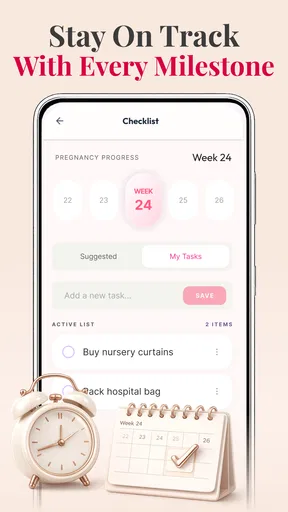
- Provides a place to keep notes and record pregnancy-related details.
- Simple layout makes key pregnancy information easy to find.
Cons
- Pregnancy information is general and cannot replace advice from a healthcare professional.
- Some features or content may require an internet connection.
- Milestones and due-date estimates may vary from one pregnancy to another.
- Reminders can feel unnecessary if you already use a calendar or health app.
- The experience may include ads or prompts to access additional features.
FAQs for Pregnancy Tracker: Baby Growth
What can you do with Pregnancy Tracker: Baby Growth?
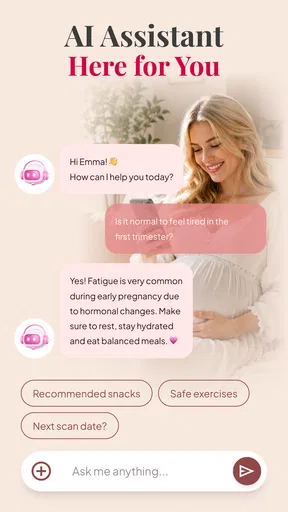
Pregnancy Tracker: Baby Growth is designed to help expectant parents follow pregnancy week by week. Depending on the app’s available features, it may provide fetal development updates, pregnancy guidance, appointment or symptom tracking, and tools for recording personal notes. It is an informational companion rather than a substitute for advice from a doctor or midwife. Check the app listing to confirm which features are included in the current version.
How accurate are the baby growth and pregnancy week updates?
The app’s week-by-week updates offer general estimates of how pregnancy and fetal development typically progress. They cannot determine a baby’s actual size, health, or development, which vary from pregnancy to pregnancy and are assessed by qualified healthcare professionals. Use the information for general context, not diagnosis or treatment decisions. If an update seems inconsistent with your pregnancy dates or you have concerns, confirm the details with your healthcare provider.
Can Pregnancy Tracker: Baby Growth replace prenatal care or medical advice?
No. A pregnancy tracking app can help organize information and make general guidance easier to access, but it cannot examine you, interpret test results, or respond to emergencies. Continue attending prenatal appointments and follow the advice of your healthcare professional. Contact your care team about symptoms or questions, and seek urgent medical help when needed rather than relying on an app for a diagnosis or treatment recommendation.
Is Pregnancy Tracker: Baby Growth free, and does it include in-app purchases or ads?
Pricing, advertisements, and optional purchases can differ by platform, region, and app version. Before installing, review the Google Play or App Store listing for the current price, subscription terms, and any in-app purchases. If the app offers a paid plan, check what it unlocks and whether billing renews automatically. You can also review recent user feedback to see whether people mention ads or features being restricted.
What personal information should you consider before using the app?
Pregnancy details, cycle dates, symptoms, and notes can be sensitive personal information. Before entering them, review the app’s privacy policy and the data disclosures shown on its store page to understand what may be collected, stored, or shared. Check whether account creation is required and whether you can delete your information. Only provide details you are comfortable sharing, and keep your device protected with an appropriate screen lock.


